Handling Float Numbers in Python (float)
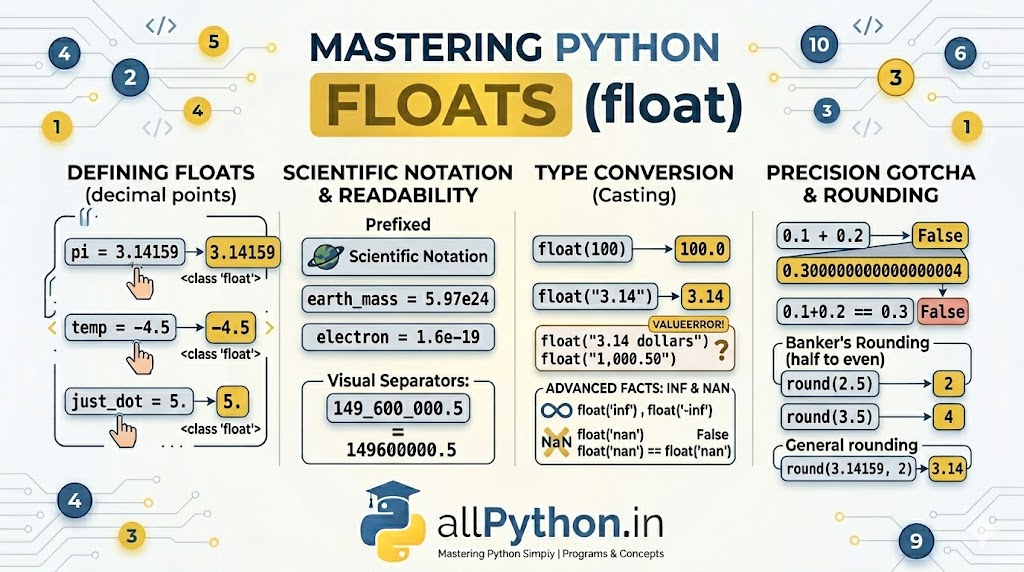
While integers handle our whole numbers, the real world is full of fractions, percentages, and precise measurements. In Python, any number containing a decimal point is represented by the float data type. Floats are incredibly versatile and handle everything from simple prices to complex scientific equations, but they come with specific computational behaviors that every Python developer must master.
1. Defining Float Variables
Creating a float is as simple as including a decimal point in your number assignment. Python dynamically types the variable as a float.
# Standard decimal assignment
pi = 3.14159
temperature = -4.5
just_a_dot = 5.  # Evaluates to 5.0

print(type(pi))  # Output: <class 'float'>
Scientific Notation (The 'e' Syntax)
For astronomically large or microscopically small numbers, Python supports scientific notation using the letter e or E (meaning "times 10 to the power of").
# Large numbers (e.g., 5.97 * 10^24)
earth_mass_kg = 5.97e24
print(earth_mass_kg)  # Output: 5.97e+24

# Small numbers (e.g., 1.6 * 10^-19)
electron_charge = 1.6e-19
print(electron_charge) # Output: 1.6e-19
2. Type Conversion (Casting to float)
You can easily convert integers and strings into float objects using the built-in float() function.
From Integer to Float
Python simply appends a .0 to the integer to convert it to a floating-point number.
whole_number = 100
converted = float(whole_number)
print(converted)   # Output: 100.0
From String to Float
You can convert strings containing valid decimals, whole numbers, or even scientific notation directly into floats.
print(float("3.14"))   # Output: 3.14
print(float("-9.99"))  # Output: -9.99
print(float("1e3")) # Output: 1000.0Just like integers, if the string contains text, commas, or spaces between digits,
float() will crash.
# float("3.14 dollars")  # Raises ValueError
# float("1,000.50")      # Raises ValueError (commas not allowed)
3. The Floating-Point Precision "Gotcha"
This is the most famous quirk of floating-point numbers in modern programming. Because computers use base-2 (binary) fractions to represent base-10 (decimal) fractions, some numbers cannot be represented perfectly in memory. This leads to tiny, microscopic precision errors.
# The classic float precision error
result = 0.1 + 0.2
print(result)
# Output: 0.30000000000000004 (Not exactly 0.3!)

# Direct equality checks can fail!
print(0.1 + 0.2 == 0.3) # Output: False== to compare floats. Instead, use the math.isclose() function.
import math
print(math.isclose(0.1 + 0.2, 0.3)) # Output: Truedecimal module.
4. Rounding Floats: The "Banker's Rounding" Rule
Python provides the built-in round(number, ndigits) function to round floats to a specific number of decimal places. However, Python 3 handles midpoints (like .5) differently than you might have learned in elementary school. It uses a strategy called "Round half to even" (often called Banker's Rounding).
# Standard rounding to specified decimal places
print(round(3.14159, 2))  # Output: 3.14

# The "Half to Even" rule in action
print(round(2.5))  # Output: 2 (Rounds down to nearest even integer)
print(round(3.5))  # Output: 4 (Rounds up to nearest even integer)
Why? This statistical method helps eliminate the upward numerical bias that would occur if you constantly rounded .5 up across massive datasets.
💡 Advanced Concepts: Infinity and NaN
The float type in Python conforms to the IEEE 754 standard, which includes special representations for concepts that aren't strictly numbers.
- Infinity (inf): You can represent positive or negative infinity. It acts mathematically as a value larger (or smaller) than any other number. It is created via
float('inf')orfloat('-inf'). - Not a Number (NaN): Used to represent undefined or unrepresentable numerical results (like missing data in Pandas arrays). It is created via
float('nan').
positive_infinity = float('inf')
print(positive_infinity > 999999999999999)  # Output: True

not_a_number = float('nan')
print(not_a_number == float('nan')) # Output: False (NaN is never equal to itself!)