Handling Integer Numbers in Python (int)
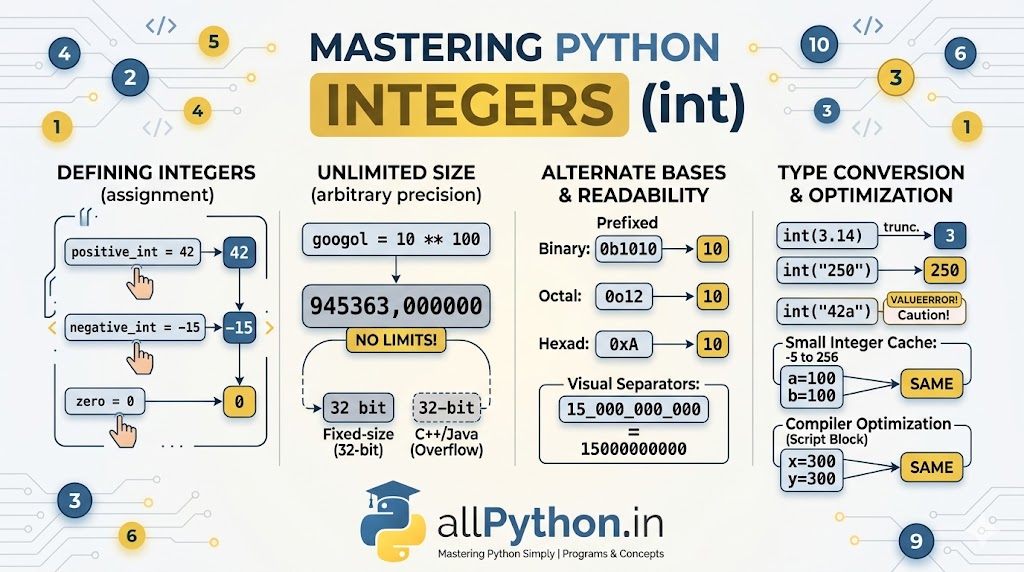
Integers are the most fundamental numeric data type in programming. In Python, the int class represents whole numbers without any fractional or decimal parts. While they seem simple, Python handles integers with some incredibly powerful, unique mechanisms under the hood that set it apart from languages like C++ or Java.
1. Defining Integer Variables
Creating an integer in Python is completely straightforward. You simply assign a whole number (positive, negative, or zero) to a variable. Thanks to dynamic typing, Python automatically recognizes it as an int.
# Basic integer assignment
positive_int = 42
negative_int = -15
zero = 0

print(type(positive_int))  # Output: <class 'int'>
2. The Superpower: Arbitrary-Precision Integers
In languages like Java or C, integers have a strict memory limit (e.g., 32-bit limits capping out around 2.14 billion). If you go over, the program crashes or "overflows".
Python 3 has no such limit. Integers in Python have arbitrary precision. They can grow as large as your computer's RAM allows. You will never encounter an integer overflow error in standard Python arithmetic.
# Calculating a massive number (10 to the power of 100)
googol = 10 ** 100
print(googol)
# Output: 10000000000000000000000000000000000000000000000000000000000000000000000000000000000000000000000000000
3. Readability: Visual Separators
When working with large integers like billions or millions, it is hard to read a string of zeros. Python allows you to use underscores (_) as visual separators in your code. Python ignores these underscores during execution.
# Without separators (hard to read)
budget = 15000000000

# With separators (easy to read)
budget = 15_000_000_000

print(budget)  # Output: 15000000000
4. Alternate Number Systems
While we default to Base-10 (Decimal), Python allows you to write integers in other mathematical bases by adding a specific prefix.
# Binary (Base-2): prefix with '0b' or '0B'
binary_num = 0b1010
print(binary_num)  # Output: 10

# Octal (Base-8): prefix with '0o' or '0O'
octal_num = 0o12
print(octal_num)   # Output: 10

# Hexadecimal (Base-16): prefix with '0x' or '0X'
hex_num = 0xA
print(hex_num)     # Output: 10
5. Type Conversion (Casting to int)
You will frequently need to convert data from other types (like strings from user input or floats from division) into integers. You do this using the built-in int() function.
From Float to Int
When converting a float to an integer, Python truncates the decimal. It does not round up or down based on proximity; it simply chops off everything after the decimal point.
print(int(3.14))   # Output: 3
print(int(9.99))   # Output: 9 (Notice it does NOT round to 10)
print(int(-4.8))   # Output: -4
From String to Int
You can convert strings containing valid whole numbers into integers.
user_input = "250"
score = int(user_input)
print(score + 50) # Output: 300If the string contains decimals, letters, or spaces between digits,
int() will fail.
# int("10.5")  # Raises ValueError
# int("42a") # Raises ValueErrorint(float("10.5")).
From Boolean to Int
Booleans are technically a subclass of integers in Python.
print(int(True))   # Output: 1
print(int(False))  # Output: 0
💡 Advanced Fact: Small Integer Caching & Compiler Optimization
To optimize performance and save memory, Python pre-loads an array of integers ranging from -5 to 256. Any variable assigned a number in this range points to the exact same pre-allocated object in memory.
The Execution Nuance: What happens if you assign a number outside this range, like 300?
- In the Interactive Shell (REPL): If you execute
x = 300andy = 300on separate lines, Python evaluates them independently, creating two distinct objects.x is ywill returnFalse. - In a Script (.py file) or Code Block: If you write this in a script, Python's compiler optimizes the code block. It notices you used the literal
300twice, so it points both variables to the same object to save memory.x is ywill returnTrue!
# Inside the cache (-5 to 256) - Always the same object
a = 100
b = 100
print(a is b)  # Output: True

# Outside the cache (e.g., 300) - Context matters!
x = 300
y = 300
print(x is y)  # Output: False (in REPL), True (in a script/block)