Handling String Variables in Python (str)
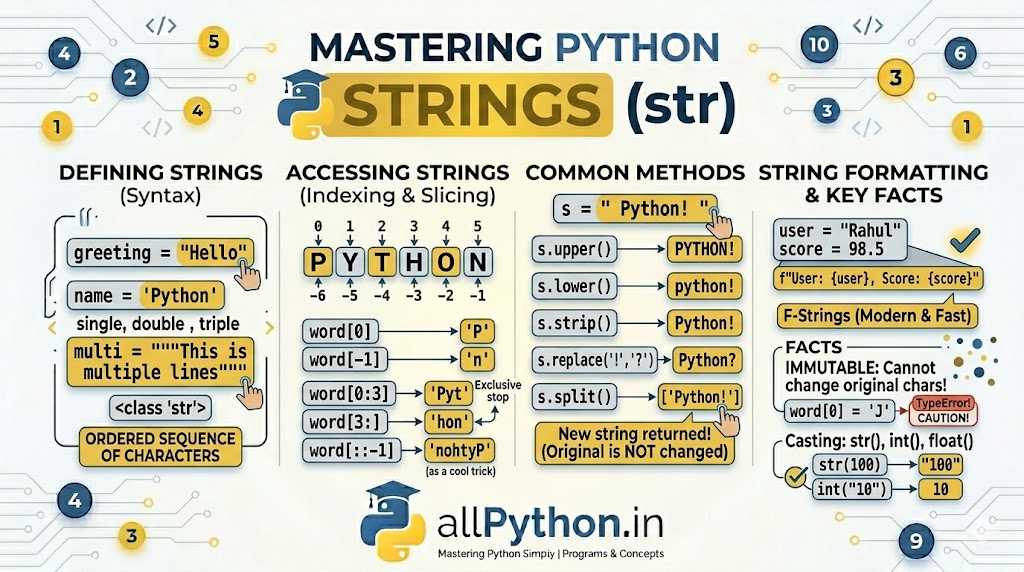
In Python, a String (represented by the str class) is a fundamental data type used to store and manipulate textual data. Technically, a string is an ordered sequence of characters. Whether it's a single letter, a full sentence, or the entire contents of a text file, Python treats it all as a string.
1. Defining String Variables
You can create string variables using single quotes, double quotes, or triple quotes. Python is highly flexible here, but knowing when to use which is important.
Single and Double Quotes
Single and double quotes do the exact same thing. You typically choose one over the other depending on whether your text contains quotes inside it.
# Basic string assignment
greeting = "Hello, Python!"
name = 'allPython'

# Handling inner quotes naturally
quote = "It's a wonderful day to code."
html_tag = '<a href="https://allpython.in">Link</a>'
Triple Quotes (Multi-line Strings)
If you have a string that spans multiple lines (like a paragraph or a SQL query), you use triple single (''') or triple double (""") quotes.
query = """SELECT * FROM users
WHERE age > 18
ORDER BY name;"""

print(type(query))  # Output: <class 'str'>
2. Accessing Characters: Indexing & Slicing
Because strings are ordered sequences, every character has a specific numbered position, called its index. Python uses zero-based indexing.
Indexing
You can extract a single character by placing its index inside square brackets []. Python also supports negative indexing, which counts backwards from the end of the string.
text = "PYTHON"

print(text[0])   # Output: P (First character)
print(text[3])   # Output: H
print(text[-1])  # Output: N (Last character)
print(text[-2])  # Output: O (Second to last)
Slicing
You can extract a chunk of a string (a substring) using slicing syntax: [start:stop:step].
- start: The index where the slice begins (inclusive).
- stop: The index where the slice ends (exclusive).
word = "Developer"

print(word[0:3])   # Output: Dev
print(word[3:])    # Output: eloper (From index 3 to the end)
print(word[:5])    # Output: Devel (From the start up to index 5)
print(word[::-1])  # Output: repoleveD (A neat trick to reverse a string!)
3. Essential String Methods
Python strings come packed with built-in methods (functions) to manipulate text. Note: None of these methods change the original string; they return a brand new string with the modifications.
message = "   Welcome to allPython!   "

# Changing Case
print(message.upper())   # "   WELCOME TO ALLPYTHON!   "
print(message.lower())   # "   welcome to allpython!   "

# Removing Whitespace
print(message.strip())   # "Welcome to allPython!"

# Replacing Text
clean_msg = message.strip()
print(clean_msg.replace("Welcome", "Hello"))  # "Hello to allPython!"

# Splitting into a List
print(clean_msg.split(" "))  # ['Welcome', 'to', 'allPython!']
4. String Formatting (f-strings)
Often, you need to inject variables directly into a string. While older versions of Python used % formatting or the .format() method, Python 3.6 introduced f-strings (Formatted String Literals), which are faster and much more readable.
Just put an f before the opening quote, and place your variables inside curly braces {}.
user = "Rahul"
score = 98.5

# The modern, clean way to format strings
greeting = f"Hello {user}, your final score is {score}."

print(greeting)
# Output: Hello Rahul, your final score is 98.5.
💡 Critical Concept: String Immutability
A vital characteristic of Python strings is that they are immutable. This means once a string object is created in memory, its contents cannot be altered or overwritten.
If you try to change a specific character using its index, Python will throw an error.
name = "Jython"
# name[0] = "P" # Raises TypeError: 'str' object does not support item assignmentname = "P" + name[1:]