Handling Variables in Python
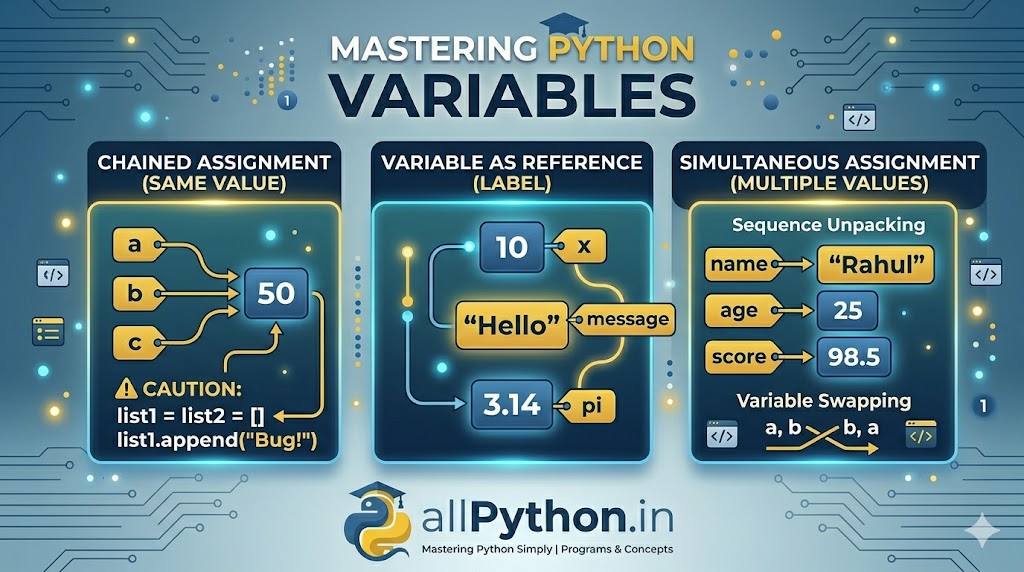
In programming, variables are fundamental. In Python, however, variables behave differently than in languages like C or Java. This guide provides an exhaustive look at how Python handles variables, assignment, naming conventions, and dynamic typing.
1. What Exactly Is a Variable in Python?
Many introductory courses describe variables as "buckets" or "storage boxes" that hold data. While this metaphor is easy for beginners, it is technically inaccurate in Python.
In Python, a variable is not a memory location that *holds* a value. Instead, think of a variable as a **tag** or a **label** that is attached to an **object** in memory.
When you create data in Python (like the number 5 or the string "Hello"), Python creates an object in memory. The variable name just *references* (points to) that object.
2. Declaration and Assignment (Syntax)
2.1. Basic Assignment
Python has no command for declaring a variable. You create a variable the moment you assign a value to it using the single equals sign (=).
# Creating integer variables
x = 10
y = 50

# Creating a string variable
website = "allPython.in"

# Creating a boolean variable
is_running = TrueThe
= sign is the assignment operator, not an equality checker. x = x + 1 means "calculate x + 1, and attach the tag 'x' to the new result," not that x equals x+1. (For equality check, use ==).
2.2. Assigning Same Value to Multiple Variables
You can assign the same value to several variables simultaneously in a single line using a "chained" assignment. This creates only one object in memory, and all variables reference that same object.
# Chained Assignment
a = b = c = 50

print(a, b, c)  # Output: 50 50 50

# Verification: all point to the same memory ID
print(id(a))
print(id(b))
print(id(c)) # (Advanced: These will all be identical)While chained assignment is fine for immutable types like integers and strings, it can lead to bugs with **mutable** objects (like lists or dictionaries).
# This is risky for mutable types!
list1 = list2 = []  # both reference the SAME empty list

list1.append("Bug Alert!")
print(list2)  # Output: ['Bug Alert!'] (We didn't touch list2!)
2.3. Assigning Multiple Values to Multiple Variables (Unpacking)
A powerful, "Pythonic" feature is simultaneous assignment. Python allows you to assign values to multiple variables in one statement, where the items are separated by commas. This is also called sequence unpacking.
The number of variables on the left must exactly match the number of values on the right.
# Multiple Assignment (integer, float, string)
name, age, score = "Rahul", 25, 98.5

print(name)  # Output: Rahul
print(age)   # Output: 25
print(score) # Output: 98.5A classic benefit of simultaneous assignment is swapping variable values without needing a temporary variable.
a = 5
b = 10

# Swap using tuple unpacking (Standard Python way)
a, b = b, a  # b's value goes to a; a's value goes to b

print(a, b)  # Output: 10 5
2.4. Dynamic Typing (Exhaustive Content)
This is a defining feature of Python. Python is **dynamically typed**, meaning you do not need to specify the data type (int, string, float) when creating a variable. Python infers the type automatically based on the assigned value.
More importantly, you can change the type of data a variable references *on the fly*.
# x initially references an integer
x = 10
print(type(x))  # Output: <class 'int'>

# x now references a string (same variable name, new object)
x = "Python"
print(type(x))  # Output: <class 'str'>
Compare this to Java or C, where a variable declared as 'int' can only ever hold integers.
3. Variable Naming Rules & Conventions
While you have freedom in choosing variable names, you must follow strict rules, and you should follow widely accepted community guidelines (conventions) for readable code.
Strict Rules (Must Follow)
- Variable names must start with a letter or an underscore (
_). - Variable names cannot start with a number.
- They can only contain alpha-numeric characters and underscores (A-z, 0-9, and _ ).
- Variable names are **case-sensitive** (
Age,age, andAGEare three different variables). - They cannot be any of Python's **keywords** (reserved words like
if,def,while,import).
Naming Conventions (Should Follow for Good Code)
The standard convention for Python variable names (as outlined in PEP 8) is to use **snake_case** for multi-word variables. Snake case is all lowercase, with words separated by underscores.
# Good practice (Snake Case)
user_first_name = "Rahul"
total_score = 95
db_connection_timeout = 30

# Avoid these styles (often used in other languages)
userFirstName = "Rahul"  # CamelCase (used for class names in Python)
UserFirstName = "Rahul"  # PascalCase (avoid for standard variables)

# Bad practice (Unclear names)
u_f_n = "Rahul" # What does 'u_f_n' mean?
a = 10 # Is 'a' an age, count, index? Be descriptive.
4. Advanced: Internal Mechanisms (References and `id()`)
To really master variables, you need to understand what Python does behind the scenes using the built-in id() function, which returns the unique identity (memory address) of an object.
Multiple References to the Same Object
When you assign one variable to another, Python does not copy the data. It just creates another reference pointing to the *same existing object*.
x = "allPython"  # Object "allPython" is created
y = x             # 'y' now references the same object as 'x'

# Both print statements will output the exact same identity ID
print(id(x))
print(id(y))

# Verification
print(x is y) # Output: True (This confirms they are the identical object)
Re-assignment Means Creating New Objects
In Python, integers and strings are *immutable* (they cannot be changed). When you modify their value, you are actually creating a completely new object and re-attaching the label.
a = 10
original_id = id(a)
print(original_id) # Example output: 1407355

a = a + 1
new_id = id(a)
print(new_id)      # Example output: 1407356 (The ID has changed!)
💡 Key Takeaways on Python Variables
- Variables are references (labels) to objects in memory, not data containers.
- Assignment (
=) attaches a label to an object. - Multiple assignment is dynamic, supporting chained (
a=b=c) and simultaneous unpacking (a,b=1,2). - Python is dynamically typed: Variable types are inferred and can change.
- Integers/Strings are immutable; modifying them creates new objects.